
QR Code for T-Shirts
Print a QR code on t-shirts, hoodies and tour merch that opens your music, your shop or your page. Here’s how to size it, where to put it and which file to send your printer so it still scans on fabric. You can change the link long after the shirts are sold.
Create your t-shirt QR code free →How to put a QR code on a shirt
-
1
Pick what the shirt opens
One link works best, like your new single, your store or a fundraiser page. If you want several, build a Multi-link page with a button for each and use its QR code.
-
2
Make a Link QR code
Pick the Link type, paste the address into the Link field and tap Test Link to check it opens. A short, simple code prints more cleanly on fabric than a busy one.
-
3
Choose colors for the shirt
Keep the code dark and its background light. On a black or navy shirt, print the code on a white or cream square instead of printing a light code straight onto dark fabric, which some phone cameras won’t read.
-
4
Send the right file
For screen printing, download SVG or EPS on Starter and Pro. For direct to garment or heat transfer, the largest PNG, about 2400 pixels wide, covers a code up to 8 inches wide.
-
5
Test a real shirt
Order one sample, put it on and have a friend scan it from a few feet away. Then wash it a few times and scan it again before you order the full run.
Tour shirts that keep promoting the band
The Static Owls print 200 tour shirts with a 5 inch code on the back. During the tour it opens the ticket page for the next show. When the tour ends, they change the link to their new single, and fans who wear the shirt to the grocery store are now sending people to the song.
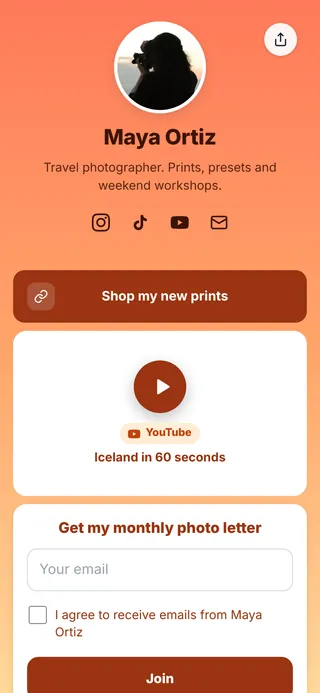
Or point the shirt at a page like this
Maya Ortiz, a travel photographer, sells shirts at her workshops. Her code opens a Multi-link page with her prints shop, a video and an email signup, so one scan can turn into a sale or a new subscriber.
Tap Use this example to get your own copy, then swap in your name, photo and links.
Use this examplePlacement tips for shirts and hoodies
-
✓
Put it where the fabric lies flat The upper chest and the space between the shoulder blades stay the flattest. Skip pockets, seams, the hood and the bottom hem, where the code folds or bunches.
-
✓
Mind the stretch A code on a fitted shirt stretches wider than it is tall when someone wears it. Test on the body, not flat on a table, and go a little bigger on stretchy fabric.
-
✓
Add a few words people can read A line like “Scan for the new album” printed above the code tells strangers why to stop. On Starter and Pro the Frame tab can add your own label to the code itself.
-
✓
Plan what it opens next Shirts last for years. Decide what the link should open after the tour, the race or the launch, and update it then, so an old shirt never leads to a page that’s gone.
T-shirt QR code questions
Will a QR code on a shirt actually scan?
Yes, if it’s big enough, flat enough and has strong contrast. Print a dark code on a light patch, give it at least 3 inches on the chest, and keep it away from seams and folds. Then scan a sample shirt while someone wears it, because fabric stretches in a way paper doesn’t.
How big should a QR code be on a t-shirt?
About 3 to 4 inches wide on the chest, so people can scan it from a few feet away. A code on the back is usually seen from farther off, so 5 inches or more works better there. A common rule is one inch of code for every 10 inches of distance.
Can I change where the shirt QR code goes after printing?
Yes. Every AQRHub code is dynamic, so the link lives in your dashboard, not in the ink. Paste a new link and save, and every shirt you’ve already sold or given away opens the new page.
Which file should I send to my t-shirt printer?
Screen printers usually ask for a vector file, so send SVG or EPS, which Starter and Pro download. Direct to garment printing and heat transfers work from a PNG, and the largest PNG, about 2400 pixels wide, is enough for a code up to 8 inches wide at 300 DPI. PNG downloads on the free plan carry a small watermark.
Can one shirt link to all my music, videos and shop?
Yes. Make a Multi-link page with a button for each thing, like streaming, tickets and merch, and print its QR code on the shirt. You can add up to 100 links on every plan and change them any time.
More for your merch
- Multi-link page
All your links on one page, with its own QR code to put on the shirt.
- QR code with a logo
Put your band or brand logo in the middle of the code on Starter and Pro.
- QR code size guide
How big a code needs to be for the distance people will scan it from.