
Link in bio page with a QR code
One page for all your links, like your shop, booking, menu, videos and socials. Share it with a short link like aqrhub.com/yourname in your bio, and print its QR code on anything. Up to 100 links on every plan, free to start.
Create your link in bio page →A Multi-link page that works in your bio and in print
-
✓
A short link for your bio like aqrhub.com/yourname Pick a handle and your page gets a clean link, ready for Instagram, TikTok, YouTube or any social bio. Handles are free on every plan. If you change it later, the old one keeps working for 90 days.
-
✓
The QR code is built in Every Multi-link page is also a QR code. Put it on a sign, a menu, a business card or packaging. Style it with your colors, and on Starter and Pro add your logo or an icon, a frame and a border. The printed code never needs to change.
-
✓
Up to 100 links and headers, on every plan Add up to 100 links. Pick a type for each (website, Instagram, TikTok, YouTube, WhatsApp, phone, email, directions, Google Reviews, Yelp, DoorDash, OpenTable, Calendly, Etsy, Venmo, Spotify and more) and it gets a matching icon and button text. Group them with short headers like “Shop” or “Follow me”.
-
✓
Tap to copy, on every plan Add a Copy button for your Zelle, phone number, email or payment handle. It shows on the button, and one tap copies it for people, like your Zelle number (786) 555-0123.
-
✓
Themes and your own colors Every plan gets your photo or logo and your header color. Starter and Pro add 12 themes (Clean, Dark, Soft gradient, Photo background, Sunset, Ocean, Forest, Midnight, Blush, Mono, Neon and Sand), button styles, fonts, your own colors, a background image, a wide banner photo, a highlighted link and a row of social icons.
-
✓
Video and music that play on your page On Starter and Pro, add a video or song from YouTube, Vimeo, TikTok, Spotify, Apple Music or SoundCloud. It plays right on your page, and loads only when someone taps play.
-
✓
Email signups On Starter and Pro, add an Email signup with your own title and button text. Everyone who signs up shows in the Signups tab, ready to export as a CSV for your email tool.
-
✓
Photo galleries On Starter and Pro, add up to 12 photos as a row people swipe through or a two column grid. Add a caption or a link to each one. A photo without a link opens full screen with a tap.
-
✓
Looks right on computers too On a computer, your page shows as a phone-width column in the middle of the screen, exactly as it looks on a phone, over a darker version of its background. On Starter and Pro, put a solid color or your own image behind it.
-
✓
See what people tap Every plan counts QR code scans. On Starter and Pro, the Stats tab shows taps on each link, social icon and gallery photo, plays of each video or song, and signups, with visits from your handle link counted apart from scans. See QR code analytics.
Make your link in bio page in three steps
Create a free account and pick Multi-link. Add a title, a short bio, a photo or logo, and your links. The live preview shows your page as you type.
Type the handle you want for aqrhub.com/yourname and we tell you right away if it’s available. Choose your header color, or on Starter and Pro a theme, fonts and button style.
Paste your link in your social bios and download the QR code for print. Change your links any time. The link and the code keep working.
What people put on a Multi-link page
Like one? Tap Use this example to start your own page from it, with sample info you can change. Free examples look just the same on the free plan. Starter examples add themes, videos and more.
-
Free
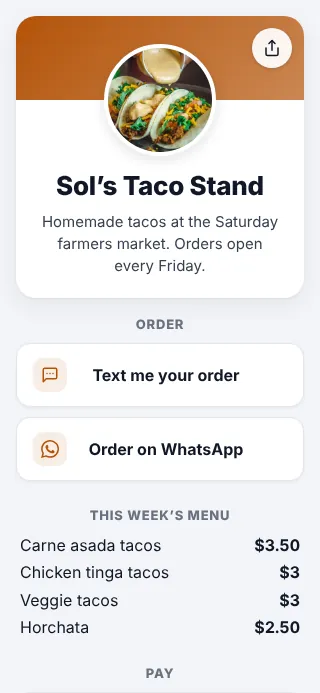
A food seller
Orders by text or WhatsApp, the menu, Cash App and Venmo, and where to find you.
aqrhub.com/solstacos
-
Free
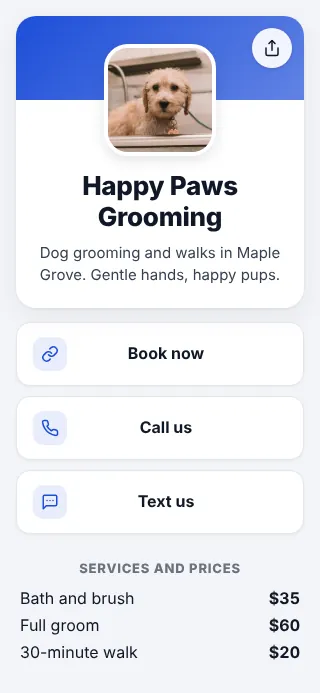
A dog groomer
Book now, call or text, services and prices, hours, Instagram and reviews.
aqrhub.com/happypaws
-
Free
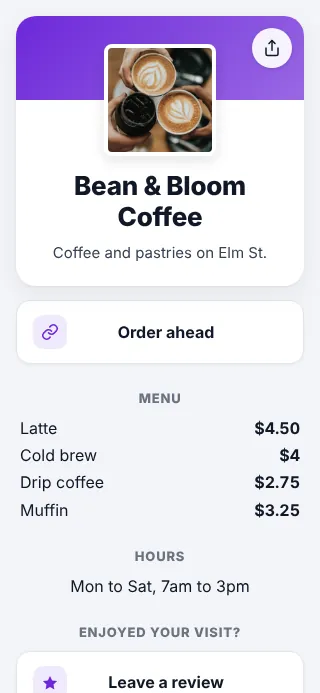
A coffee shop
Order ahead, the menu with prices, hours, Instagram and reviews.
aqrhub.com/beanandbloom
-
Starter
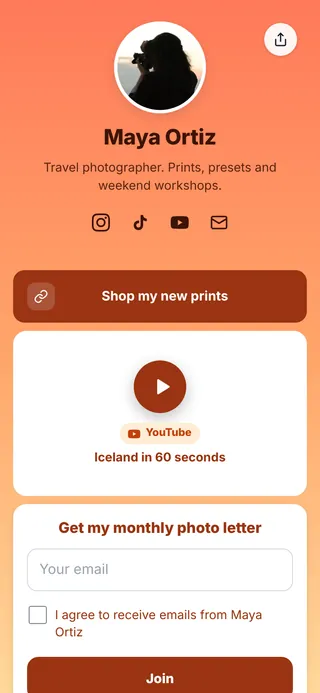
A creator
Sunset theme, social icons, a video and an email signup.
aqrhub.com/mayaortiz
-
Starter
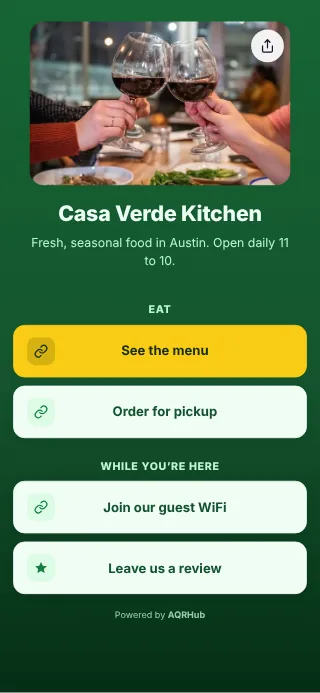
A restaurant
One table code for the menu, guest WiFi and reviews. See restaurant QR code menus.
aqrhub.com/casaverde
-
Starter
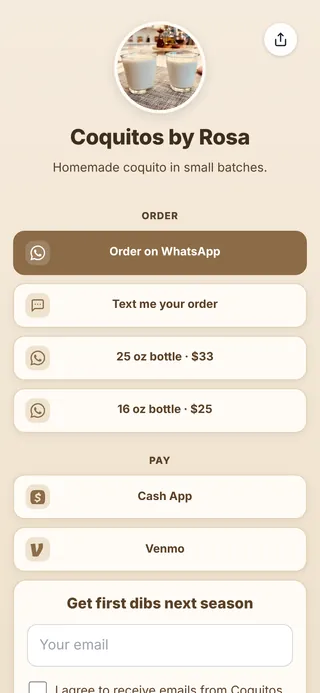
A home business
Orders by WhatsApp or text, prices and payment links in one place.
aqrhub.com/coquitosbyrosa
What each plan includes
| Multi-link page | Free | Starter | Pro |
|---|---|---|---|
| Links and headers | Up to 100 | Up to 100 | Up to 100 |
| aqrhub.com/yourname link | Yes | Yes | Yes |
| Photo or logo, header color, look on computers | Yes | Yes | Yes |
| Themes, button styles, fonts, your own colors, background image, banner photo, highlighted link, social icons | No | Yes | Yes |
| Color or image behind the page on computers | No | Yes | Yes |
| Video, music, email signups and photo galleries | No | Yes | Yes |
| QR code design | Colors, 5 dot shapes, Banner frame | Plus logo or icon, more styles, 8 frame shapes, borders | Plus logo or icon, more styles, 8 frame shapes, borders |
| QR code downloads | PNG with a small watermark | PNG, SVG, EPS and PDF, no watermark | PNG, SVG, EPS and PDF, no watermark |
| Stats | Scan counts | Link taps, plays, signups, scan trends, countries and devices | All of Starter, plus browsers, cities and unique visitors |
| “Powered by AQRHub” | Shown, as a small button | Shown, smaller | Smaller, can be hidden |
| QR codes | 1 | 25 | Unlimited |
A Multi-link page counts as one of your QR codes. See pricing.
Common questions about link in bio pages
What is a link in bio page?
A link in bio page is one simple page with all your links on it, like your shop, booking, menu, social profiles and more. You put its short link in your Instagram, TikTok or other social bio, and print its QR code on signs, cards and packaging. On AQRHub it’s called a Multi-link page.
Is the link in bio page free?
Yes. The free plan includes a Multi-link page with up to 100 links and headers, a photo or logo, your header color, a handle like aqrhub.com/yourname and its QR code, with scan counts. Starter and Pro add 12 themes, custom colors, background images, social icons, videos and music, email signups, photo galleries and link stats.
How do I get a link like aqrhub.com/yourname?
Type the handle you want in the Your link box when you create the page, or later on its Edit page, and we tell you right away if it’s available. A handle is 3 to 30 letters, numbers, dots or underscores. Handles are free on every plan and optional.
Does my page come with a QR code?
Yes. Every Multi-link page is a QR code too. Style it like any other code (colors and dot shapes on every plan, plus logos, frame shapes and borders on Starter and Pro) and download it as a PNG, or as SVG, EPS or PDF on Starter and Pro. The printed code and your handle link open the same page.
Can I change my links after I print the QR code?
Yes. Add, remove, rename or reorder links any time from the page’s Edit page. The printed QR code and your handle link stay the same and always open the latest version.
How many links can I add?
Up to 100 links on every plan, including the free plan. Group them with headers, and drag them or use the up and down arrows to change the order.
Can I add a video or song?
Yes, on Starter and Pro. Add Video or music and paste a link from YouTube, Vimeo, TikTok, Spotify, Apple Music or SoundCloud. It plays right on your page, and the player loads when someone taps play, so your page stays quick to open.
Can I add a photo gallery?
Yes, on Starter and Pro. Add a Gallery with 1 to 12 photos (JPG, PNG, HEIC or WebP, up to 10 MB each) and pick Swipe, a row people swipe through, or Grid, two columns. Each photo can have a short caption and a link. A photo without a link opens full screen when tapped. Photos are made smaller for the web, keep their transparent backgrounds and have their location data removed, so your page stays quick to open.
Can I collect email addresses?
Yes, on Starter and Pro. Add an Email signup with your own title and button text. Visitors enter their email and agree to hear from you. Everyone who signs up shows in the Signups tab on your code’s page, where you can export them as a CSV. We don’t send emails to them for you, so use your own email tool.
How does my page look on a computer?
On computers your page shows as a phone-width column in the middle of the screen, exactly as it looks on a phone, over a darker version of its background. On Starter and Pro you can put a solid color or your own image behind it. You can also choose Simple to show it the way pages looked before.
Can I see which links people tap?
Yes, on Starter and Pro. The Stats tab shows how many times each link, social icon and gallery photo was tapped, how many times each video or song was played, and how many people signed up. Every plan counts scans of the QR code, and visits from your handle link are counted separately.
Can I remove “Powered by AQRHub” from my page?
Yes, on Pro you can hide it. On Starter it shows as a smaller footer, and on the free plan it always shows, as a small “Make your own page” button.
You might also need